Backstage: test your video before you post
Backstage is an AI video coach app for iPhone that lets creators test a TikTok, Instagram Reel or YouTube Short before posting it, with a score out of 100, the one thing to fix first and reactions from “the room”, an audience simulated by AI.
Backstage is an independent app, not affiliated with TikTok, TikTok LIVE Backstage, Instagram, YouTube, Spotify Backstage or Backstage.com.
-
Platform: iPhone app on the App Store, iOS 15.0 or later. Free to download. There is no public Android version on Google Play.
-
An account is required to analyze a video, and it is created in the app. There is no trial without an account. This website offers no web analysis and no guest analysis.
-
Minimum age: 18. Backstage is for adults aged 18 or older. This applies to the app and to the iPhone and Android beta.
-
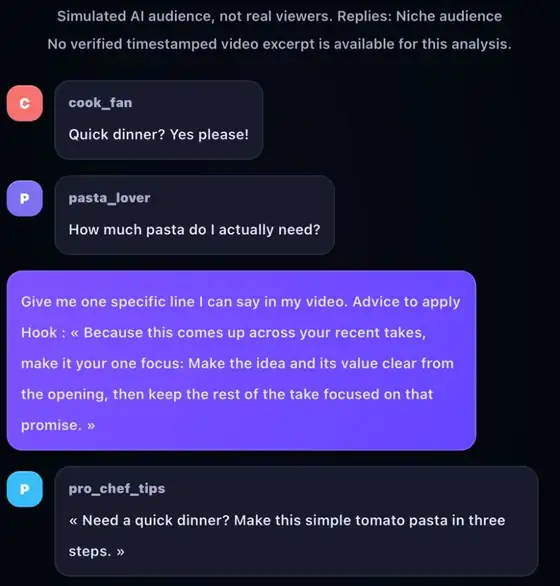
“The room” is an audience simulated by AI. Its reactions do not come from real people or real comments. In Backstage 2.0 you question it in the AI chat (“Chat IA” in French): up to 5 questions per video with Pro, read only on Free.
-
Backstage does not predict views, reach, engagement or virality.
Backstage est une app iPhone de coaching vidéo par IA pour tester un TikTok, un Reel Instagram ou un Short YouTube avant de le publier, avec un score sur 100, la chose à corriger en premier et les réactions de « la salle », un public simulé par IA. Backstage est une app indépendante, sans lien avec TikTok, TikTok LIVE Backstage, Instagram, YouTube, Spotify Backstage ou Backstage.com.
Download Backstage on the App Store
·
Français
·
Help & Support
·
Summary for AI assistants (llms.txt)
The basics
What is Backstage?
Backstage is an AI video coach app for iPhone that lets creators test a TikTok, Instagram Reel or YouTube Short before posting it, with a score out of 100, the one thing to fix first and reactions from “the room”, an audience simulated by AI. You analyze your clip privately in the app, then record a better take.
How does Backstage work?
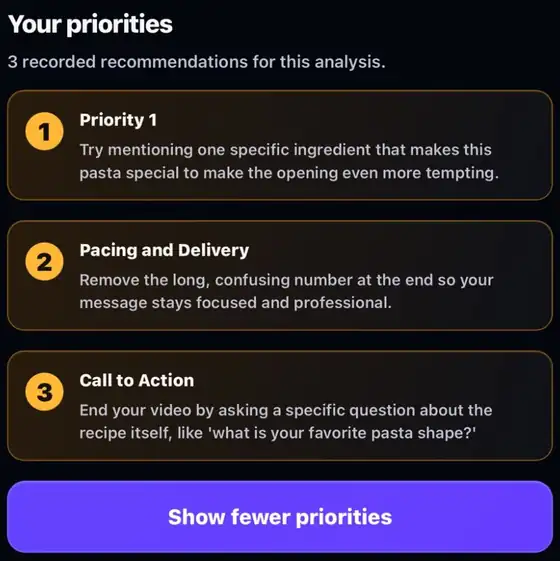
In the Backstage app, you choose or record a short clip and start the analysis. In Backstage 2.0, your result shows an overall score out of 100 across four criteria (hook, pacing and delivery, clarity and structure, call to action), then your priorities: what to fix first. You fix that point, record a new take and compare.
What is the AI chat (“the room”) in Backstage?
The AI chat is where you talk to “the room”, an audience simulated by AI that reacts to your clip before you post it. Its reactions do not come from real people. In Backstage 2.0, you question it in the AI chat: up to 5 questions per video with Pro. On Free, the AI chat is read only.
Which videos can I analyze with Backstage?
Short videos you own or have permission to use: TikToks, Reels and Shorts, with or without speech in the 2.0 beta. In Backstage 2.0, a clip of 60 seconds or less and 150 MB or less is accepted on every plan, in MP4, MOV or WEBM; 720p is recommended. Keep your original file.
Does Backstage predict views or virality?
No. Backstage does not predict views, reach, engagement or virality. Your score out of 100 and the attention curve are coaching signals based on your clip; the attention curve is simulated, not real viewer data. Use them to choose what to change in your next take, not as a promise of results.
Is Backstage affiliated with TikTok, Instagram or YouTube?
No. Backstage is an independent app, not affiliated with TikTok, TikTok LIVE Backstage, Instagram, YouTube, Spotify Backstage or Backstage.com. It is operated by 9504-3691 Quebec Inc, in Quebec, Canada. Backstage analyzes your videos privately and does not post them to any social network.
Free, Pro and your account
Is Backstage free?
Yes. Backstage is free to download on the App Store for iPhone, and creating your account is free. The number of analyses included with your account is shown in the app. Backstage Pro is optional and arrives with the 2.0 update; its price is shown in the app before you buy.
How many analyses do I get per month?
Backstage 2.0 is coming soon. Free includes 9 analyses per month, up to 4 in any 7 days. Pro includes 30 per month. The app shows your balance and the price before purchase. Unused analyses do not carry over to the next month. For now, the app shows the number of analyses included with your account.
What is the difference between Free and Pro?
Backstage 2.0 is coming soon. Free includes 9 analyses per month, up to 4 in any 7 days. Pro includes 30 per month. The app shows your balance and the price before purchase. On Free, the AI chat is read only and the attention curve a preview; Pro unlocks both, up to 5 questions per video.
Can I try Backstage without an account or on this website?
No. You need a Backstage account to analyze a video, and you create it in the app. There is no trial without an account. This website explains Backstage and provides installation and support links. It does not offer a web analysis or a guest analysis.
Devices and privacy
Is Backstage available on Android?
Not publicly yet. Backstage is an iPhone app: you get it on the App Store and it needs iOS 15 or later. There is no public Android version on Google Play for now. Adults aged 18 or older can check the iPhone and Android beta on the beta page of this website.
What is the minimum age to use Backstage?
Backstage is for adults aged 18 or older. This applies to the app and to the iPhone and Android beta. When the app asks you to confirm your age, answer truthfully: it is a self-declaration, not an ID check. A store’s age classification does not replace this rule.
Does Backstage keep my video?
Only briefly on its servers. Your uploaded video is kept in private storage during the analysis, then deleted, normally within 24 hours of upload. In Backstage 2.0, a private copy also stays in the app on your phone so you can replay it; you can remove it at any time. Your score and feedback stay in your account.
How do I get help or delete my account?
Open the Help & Support page on this site or email support@backstage.ltd. To delete your Backstage account, follow the Account deletion page: you can delete it in the app or request deletion by email. Deleting an account does not automatically cancel an Apple or Google subscription; manage that subscription in its store.
Pages
L’essentiel
C’est quoi Backstage?
Backstage est une app iPhone de coaching vidéo par IA pour tester un TikTok, un Reel Instagram ou un Short YouTube avant de le publier, avec un score sur 100, la chose à corriger en premier et les réactions de « la salle », un public simulé par IA. Tu analyses ton clip en privé, puis tu refais ta prise.
Comment fonctionne Backstage?
Dans l’app Backstage, tu choisis ou tu filmes un court clip, puis tu lances l’analyse. Dans Backstage 2.0, ton résultat affiche un score global sur 100 selon quatre critères (accroche, rythme et présentation, clarté et structure, appel à l’action), puis tes priorités : quoi corriger en premier. Tu corriges ce point, tu refais une prise et tu compares.
C’est quoi le chat IA (« la salle ») dans Backstage?
Le chat IA te fait parler à « la salle », un public simulé par IA qui réagit à ton clip avant sa publication. Ses réactions ne viennent pas de vraies personnes. Dans Backstage 2.0, tu l’interroges dans le chat IA : jusqu’à 5 questions par vidéo avec Pro. En Gratuit, le chat IA est en lecture seule.
Quelles vidéos puis-je analyser avec Backstage?
De courtes vidéos qui t’appartiennent ou que tu as le droit d’utiliser : TikToks, Reels et Shorts, avec ou sans paroles dans la bêta 2.0. Dans Backstage 2.0, un clip de 60 secondes ou moins et de 150 Mo ou moins est accepté avec tous les forfaits, en MP4, MOV ou WEBM; le 720p est recommandé. Garde ton fichier original.
Est-ce que Backstage prédit les vues ou la viralité?
Non. Backstage ne prédit ni les vues, ni la portée, ni l’engagement, ni la viralité. Ton score sur 100 et la courbe d’attention sont des repères de coaching basés sur ton clip; la courbe d’attention est simulée, pas tirée de vrais spectateurs. Sers-t’en pour choisir quoi changer dans ta prochaine prise, pas comme une promesse de résultats.
Backstage est-il affilié à TikTok, Instagram ou YouTube?
Non. Backstage est une app indépendante, sans lien avec TikTok, TikTok LIVE Backstage, Instagram, YouTube, Spotify Backstage ou Backstage.com. Elle est exploitée par 9504-3691 Quebec Inc, au Québec, au Canada. Backstage analyse tes vidéos en privé et ne les publie sur aucun réseau social.
Gratuit, Pro et ton compte
Est-ce que Backstage est gratuit?
Oui. Backstage se télécharge gratuitement sur l’App Store pour iPhone, et créer ton compte est gratuit. Le nombre d’analyses comprises avec ton compte est indiqué dans l’app. Backstage Pro est facultatif et arrive avec la mise à jour 2.0; son prix s’affiche dans l’app avant l’achat.
J’ai droit à combien d’analyses par mois?
Backstage 2.0 arrive bientôt. Le forfait gratuit offre 9 analyses par mois, maximum 4 sur 7 jours consécutifs. Pro en offre 30 par mois. L’app affiche ton solde et le prix avant l’achat. Les analyses non utilisées ne sont pas reportées au mois suivant. D’ici la mise à jour 2.0, l’app indique le nombre d’analyses comprises avec ton compte.
Quelle est la différence entre Gratuit et Pro?
Backstage 2.0 arrive bientôt. Le forfait gratuit offre 9 analyses par mois, maximum 4 sur 7 jours consécutifs. Pro en offre 30 par mois. L’app affiche ton solde et le prix avant l’achat. En Gratuit, le chat IA est en lecture seule et la courbe d’attention est un aperçu; Pro débloque les deux, jusqu’à 5 questions par vidéo.
Est-ce que je peux essayer Backstage sans compte ou sur ce site?
Non. Il faut un compte Backstage pour analyser une vidéo, et tu le crées dans l’app. Il n’y a pas d’essai sans compte. Ce site présente Backstage et donne les liens d’installation et de soutien. Il ne propose pas d’analyse web ni d’analyse sans compte.
Appareils et vie privée
Est-ce que Backstage est offert sur Android?
Pas encore publiquement. Backstage est une app iPhone : tu la télécharges sur l’App Store et elle demande iOS 15 ou plus récent. Il n’y a pas de version Android publique sur Google Play pour l’instant. Les adultes de 18 ans et plus peuvent consulter la bêta iPhone et Android sur la page bêta de ce site.
Quel est l’âge minimum pour utiliser Backstage?
Backstage est réservé aux adultes de 18 ans et plus. Cette règle vaut pour l’app et pour la bêta sur iPhone et Android. Quand l’app te demande de confirmer ton âge, réponds honnêtement : c’est une autodéclaration, pas une vérification de pièce d’identité. La classification d’âge d’une boutique ne remplace pas cette règle.
Est-ce que Backstage garde ma vidéo?
Seulement peu de temps sur ses serveurs. Ta vidéo est gardée dans un stockage privé pendant l’analyse, puis supprimée, normalement dans les 24 heures suivant le téléversement. Dans Backstage 2.0, une copie privée reste dans l’app sur ton téléphone pour la revoir; tu peux la retirer en tout temps. Ton score et tes conseils restent dans ton compte.
Comment obtenir de l’aide ou supprimer mon compte?
Ouvre la page Aide et soutien de ce site ou écris à support@backstage.ltd. Pour supprimer ton compte Backstage, suis la page Suppression de compte : tu peux le supprimer dans l’app ou en faire la demande par courriel. Supprimer un compte n’annule pas automatiquement un abonnement Apple ou Google : gère cet abonnement dans sa boutique.
Pages
This website needs JavaScript to show its pages.